
| Products->CZ Word to PDF: |
CZ Word to PDF V4.0 |



About
CZ Word to PDF is a batch PDF converter that can convert word doc/docx, html, rtf, text to Postscript Files (PDF, PS, EPS, PXL etc) and Picture/Image Files (PNG, JPEG, TIFF, PNM, BMP etc). It doesn't require Adobe Acrobat to be installed.
CZ Word to PDF supports batch conversion, command line and folder watcher. Batch conversion ability allows you to convert an unlimited number of files at a time, saving your time!
To convert your documents, just select destination file format, then click "Add Files" or "Add Folders" button to add files, final click "Convert" button to get conversion result, it is very easy to use!
| File Formats | whether can be opened? | whether can be saved? | note |
|
Word 2007/2010 Document (*.docx) Macro-enabled Word 2007/2010 Document (*.docm) Word 2007/2010 Template (*.dotx) Macro-enabled Word 2007/2010 Template (*.dotm) OpenDocument Text (*.odt) |
Y | N | you need install ms word 2007 or above |
| Word 2003 XML Document (*.xml) | Y | N | you need install ms word 2003 or above |
| Web Archive (*.mht; *.mhtml) | Y | N | you need install ms word 2002 or above |
| Word 97/2000 Documents(*.doc)
Document Templates(*.dot) Web Pages(*.htm,*.html) Rich Text Format(*.rtf) Text File(*.txt) MS-DOS Text with Layout (*.asc) Text with Layout (*.ans) Word 2.x for Windows (*.doc) Word 4.0 for Macintosh (*.mcw) Word 5.0 for Macintosh (*.mcw) Word 5.1 for Macintosh (*.mcw) Word 6.0/95 (*.doc) Word 97-2002 & 6.0/95 - RTF (*.doc) Word for Windows 5.0 (*.doc) WordPerfect 5.0 (*.doc) WordPerfect 5.0 Secondary File (*.doc) WordPerfect 5.1 for DOS (*.doc) WordPerfect 5.1 or 5.2 Secondary File (*.doc) WordPerfect 5.x for Windows (*.doc) Works 2000 (*.wps) Works 4.0 for Windows (*.wps) Works 6.0 - 9.0 (*.wtf) Works 6.0 - 9.0 (*.wps) Works 7.0 (*.wtf) Ami Pro 3.0 (*.sam) |
Y | N | you need install ms word 95 or above |
|
Lotus 1-2-3 (*.wk1;*.wk3;*.wk4) Excel Worksheet(*.xls,*.xlw) FoxPro / dBASE (*.dbf) Recover Text from Any File(*.*) |
Y | N | you need install ms word 95 or above |
| Outlook Address Book(*.olk)
Personal Address Book (*.pab) Schedule+ Contacts (*.scd) |
Y | N | you need install ms word 95, 97, 2000, 2002 or 2003
please note these formats do not be supported by ms word 2007 and above |
| Acrobat PDF Files(*.pdf)
postscript language levels 1(*.ps) postscript language levels 2 and 3(*.ps) encapsulated postscript(*.eps) HP PCL-XL(*.pxl), a graphic language understood by many recent laser printers |
N | Y | you need install ms word 95 or above
doesn't require Adobe Acrobat to be installed, supports watermark, creates encrypted documents and other many options |
|
Portable Network Graphics(*.png), is the recommended format for high-quality images. It supports full quality color and transparency, offers excellent lossless compression of the image data, and is widely supported. JPEG Files(*.jpg) PNM (portable network map)(*.pnm), very simple uncompressed image formats commonly used on unix-like systems Color and Black-White TIFF Files(*.tiff) G3 G4 TIFF FAX Files(*.tiff) BMP Files(*.bmp) PCX Files(*.pcx) PSD Files(*.psd), PSD is the image format used by Adobe Photoshop |
N | Y | you need install ms word 95 or above
supports watermark and other options |
System Requirements
1.You will need a Pentium 150 PC or higher, 16MB RAM or more.
2. The operating system should be 32 bit or 64 bit Win95, Win98, Win2000, WinNT 4.0, WinME, WinXp, Win2003, Win Vista, Win 7, Win 8, Win 2008, Win 2012.
3.Of course, you must install Microsoft Word 95 or higher for windows.
What's New
09/02/2013 released CZ Word to PDF V4.0 Build130902, fixed the watermark color error.
08/29/2013 released CZ Word to PDF V4.0 Build130829, changed the calling ms word way that can keep CZ Word to PDF more stable, and fixed the error that folder watcher won't work.
01/11/2013 released CZ Word to PDF V4.0 Build130111, supports multiple languages GUI, now including English, German, simplified Chinese, and traditional Chinese.
03/14/2011 released CZ Word to PDF V4.0 Build110314, add images (png, jpg, tiff, pnm, psd, pcx, bmp) and postscript and pdf files output formats, and support watermark and other many options.
01/25/2009 released CZ Word to PDF V3.0 Build090125,add plug-in function, so you can do some actions ( fox example: delete comments, add or change author/title information etc) before conversion, and you can get more information from faq, thanks for Charles Matz's advice.
03/14/2008 released CZ Word to PDF V2.0 Build080314,can convert the word documents with open password, and command line supports open password function, thanks for Martin Brindley's advice.
11/16/2007 released CZ Word to PDF v3.0 build071113, add page setup function, now you can output pdf files with many page sizes (like a3, a4, etc) and orientation (like landscape or portrait).
11/16/2007 released CZ Word to PDF v2.0 build071113, add page setup function, now you can output pdf files with many page sizes (like a3, a4, etc) and orientation (like landscape or portrait).
07/04/2003 released CZ Word to PDF V2.0 build030704, you can change the security, so that the user cannot print, copy, or change anything.
06/24/2003 released CZ Word to PDF V2.0 build030624, add supports of acrobat 5.0.5 and 6.0.
02/25/2003 released CZ Word to PDF V2.0 Build030225, add folder watcher that watch source file path and convert new uploading ms word DOC, RTF, text or html documents to PDF files automatically. While your user upload word documents to your website, then this folder watcher can automatically convert them into PDF format.
01/06/2003 released CZ Word to PDF V1.5 Build030106, add function that convert link and bookmark in DOC files to PDF.
04/11/2002 released CZ Word to PDF V1.0, have following function: A. Create PDF, batch convert word to PDF, DOC to PDF, html to PDF, text to PDF and RTF to PDF files quickly. B. preserves original document layout, include images and tables. C. support command line arguments. D. can add the files in subfolders to convert. E. supports drag files and folders from your desktop. F. can create run log file.
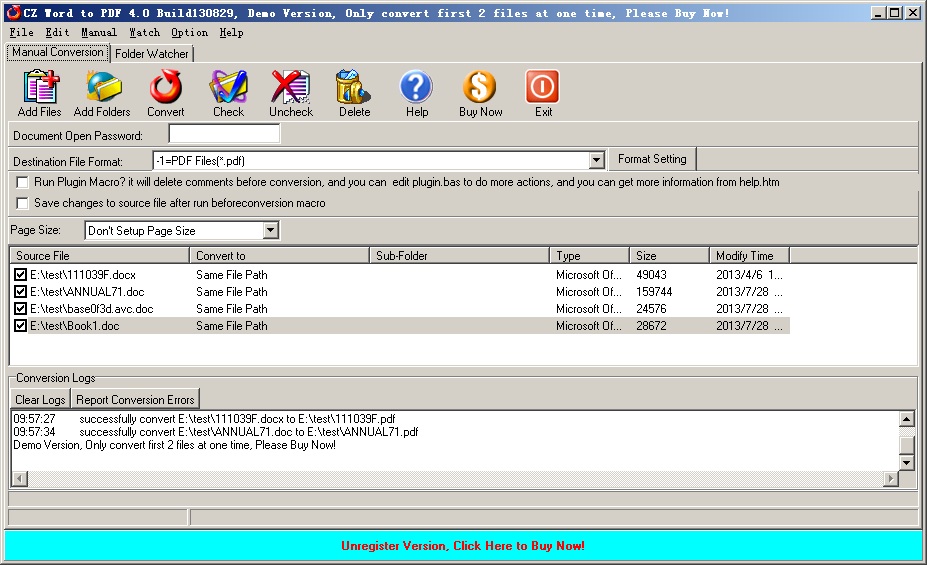
Manual Convert Interface
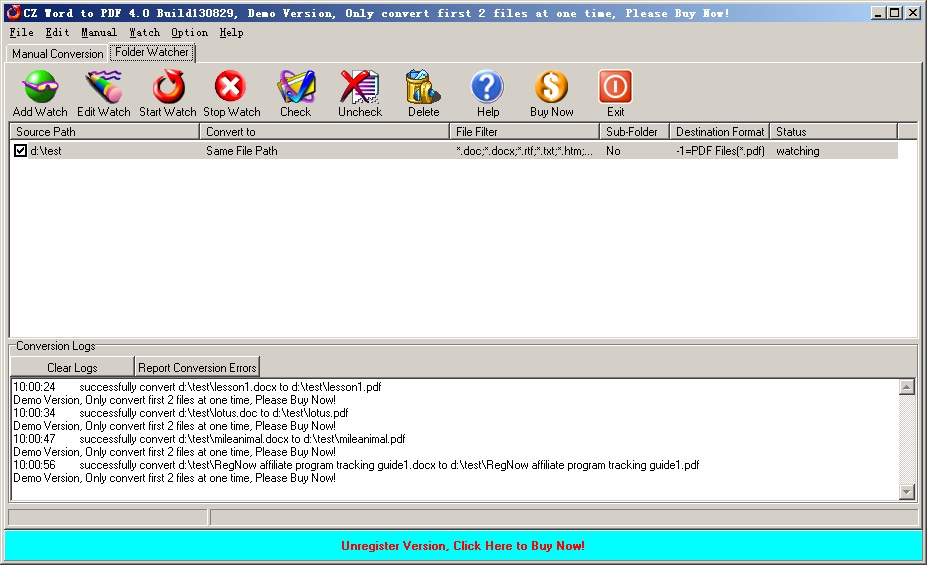
Folder Watcher Interface
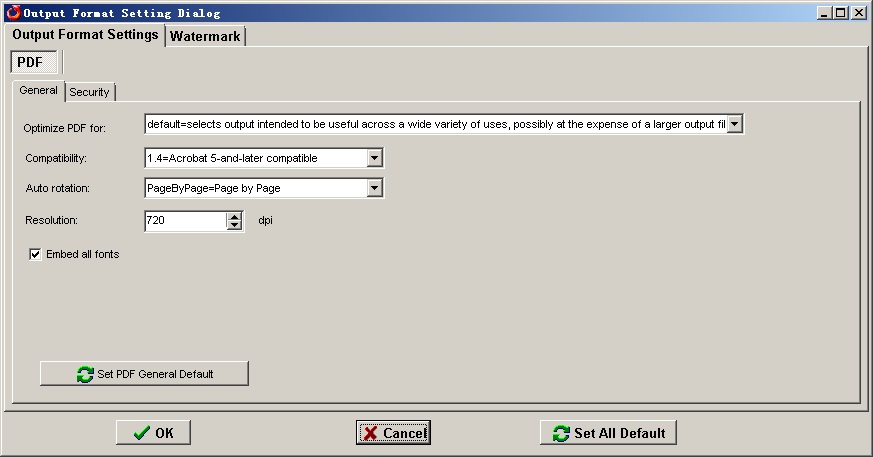
PDF General Setting
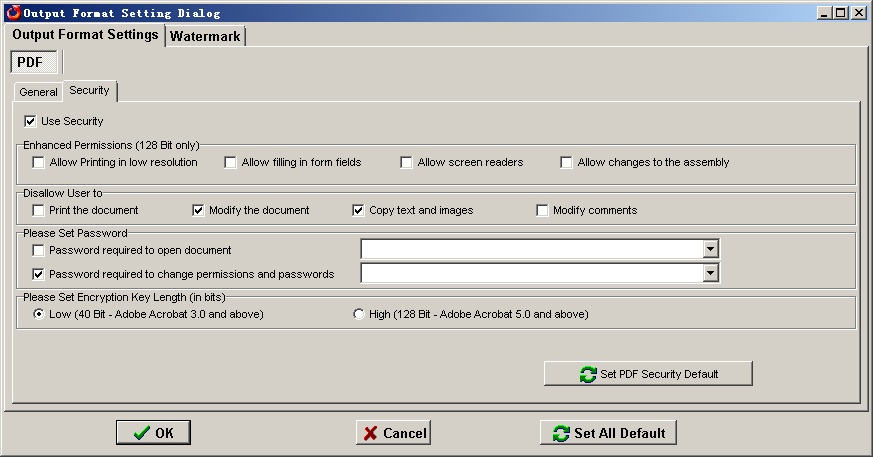
PDF Security Setting
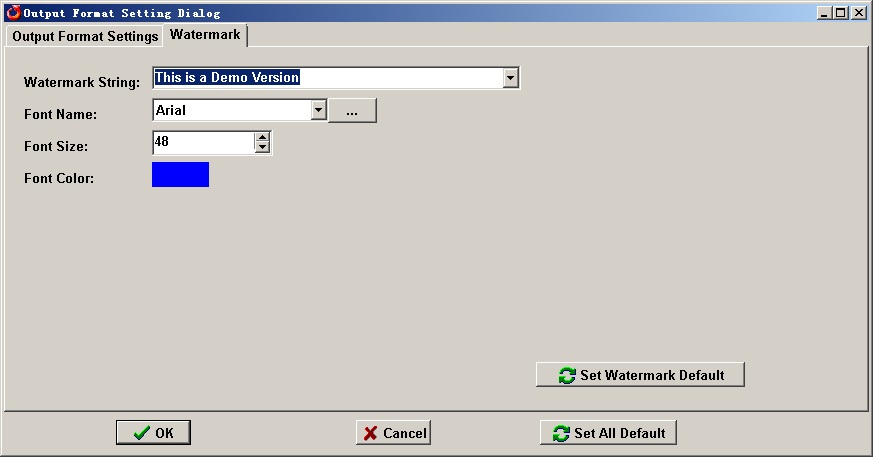
PDF Watermark Setting
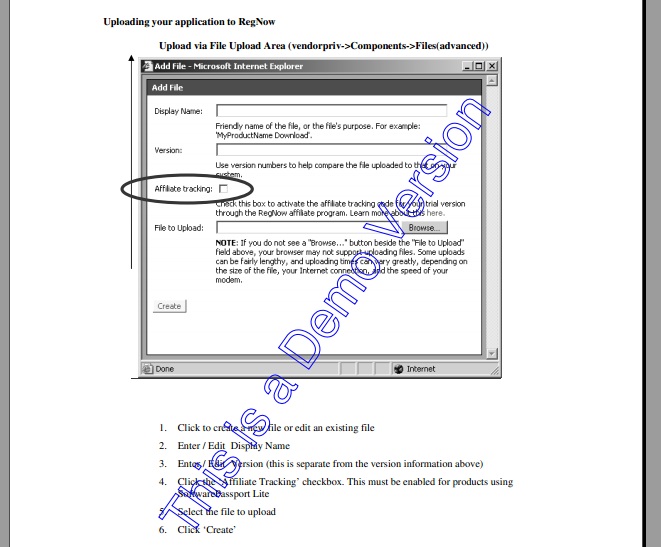
Watermark Sample
Faq
How to install it?
The install is very easy, please see the following step:
1. you only run czdoc2pdf.exe, click "yes" button while displaying the dialog with "This will install CZ Word to PDF, do you wish continue?"
2. click "next" button while displaying the dialog with "welcome to the ...."
3. select destination directory and click "next" button while displaying the dialog with "selection destination..."
4. click "next" button while displaying the dialog with "selection start..."
5. click "install" button while displaying the dialog with "ready to install"
6. click "finish" button while install finish.
How does "Manual Convert" work?
Please click "Manual Convert" tab sheet, you can simply press the "add files" button, then select the files to batch conversion list with ctrl or shift key, or click the "add folders" button to select the file folder. finally press the "convert" button, in a short time you will have finished conversion!
How does "Folder Watcher" work?
Please click "Folder Watcher" tab sheet, then click "Add Watch" button, and show a "Add Watch" dialog, and input "Source File Path", "destination File Path" and "File Filter", press "OK" button, you will add a file watch to folder watcher list. finally press "Start Watch" button, while the word documents are copied to the source path, then this folder watcher can automatically convert them into viewable html format of destination file path.
How to use command line run?
usage: cz-doc2pdf <file path> </f:<destination file format code>> [/dfn:<destination file name>] [/d:<destination folder>] [/s] [/p:<open password>] [/plugin] [/e:<exclude words in file name or file path>] [/ef:<exclude file list file>
The command line will return 1 if the conversion has error, and the command line will return 0 if the conversion is successful.
Please notice: add quotes when argument contain spaces
| file path | the path and files want to be converted, this parameter must exist. for example, "d:\test path\*.doc" As shown in the example above, filenames that include spaces must be enclosed in quotes. |
| /f:<destination file format code> | destination file format code, this parameter must exist. the format code list is following: -1 PDF file -5 PS File -15 PS2 File -16 EPS File -18 PXL File -6 PNG File -7 JPEG File -8 BMP File -9 PNM File -10 TIFF File -17 FAX File -11 PCX File -12 PSD File 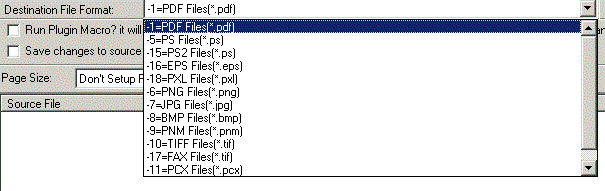 for example, /f:-1, means you want convert documents to pdf files |
| [/dfn:<destination file name>] |
the destination file name. for example /dfn:d:\test\dest.pdf, means converting to d:\test\dest.pdf file. |
| /d:<destination folder> | destination folder for example, /d:"d:\test path", means the conversion result will be saved to "d:\test path" folder |
| /s | include the files in subfolders |
| /p:<open password> | open password for example:/p:123456, means you want convert word doc files with open password 123456 |
| /plugin | run plugin macro before conversion and after conversion, and you can edit plugin.bas to do may actions ( fox example delete comments etc), you can find plugin.bas from application path |
| [/e:<exclude words in file name or file path>] | Exclude words in file name or file path, (use quotes when paths contain spaces) Hint: use ; as multi words's delmited char, for example this;test supports wildcards (just * and ?), for example *_?_*.doc matchs test_2_sdsd.doc for example /e:"\inc\;test-;test*s", means you want to exclude file name or file path include \inc\ and test- and test*s |
| [/ef:<exclude file list file>] | Exclude file list, the list is saved in text file
for example /ef:"exclude.lst", means you want to exclude file, the exclude file list is saved in exclude.lst, an exclude file per line, exclude file name supports wildcards (just * and ?), for example *_?_*.doc matchs test_2_sdsd.doc exclude.lst example is below: |
Command Line Example 1:
convert all doc files in folder e:\source to pdf files, destination folder is c:\destination, some source doc files have password "123456" protected.
cz-doc2pdf e:\source\*.doc /f:-1 /d:"c:\destination" /s /p:123456
Command Line Example 2: (this example shows how to convert files when file path with space char or long file path, you must add quotation marks beside file path )
convert test*.doc of the folder "c:\source files" to jpeg files, destination folder is "x:\destination\test\space\long file path",
cz-doc2pdf "c:\source files\test*.doc" /f:-7 /d:"x:\destination\test\space\long file path"
Command Line Example 3:
convert source.doc in c:\sourcepath to d:\destpath\dest.pdf
cz-doc2pdf "c:\sourcepath\source.doc" /f:-1 "/dfn:d:\destpath\dest.pdf"
Whether can I programmatically get feedback as to whether the conversion is successful or not (for whatever reason) while calling command line?
Yes, the command line will return 1 if the conversion has error, and the command line will return 0 if the conversion is successful.
Can CZ Word to PDF convert WordPerfect files to PDF files?
Yes, CZ Word to PDF can convert WordPerfect to PDF, but you must first open a WordPerfect file using ms word, then the system will prompt to insert the window install disk. If you can use ms word to open a WordPerfect file successfully, you can use CZ Word to PDF to convert WordPerfect file to PDF.
We are evaluating your product for our software product. We would like to distribute your product with our product if it fits to our requirement. We are interested knowing price structure for distribution license, where we can bundle your product with our product.
You can choose to pay for each copy, or pay for Developer License. After you order the developer license, there is not any limit for the developer license, you can bundle our product to your application, then redistribute your application to anyone, any times, and anytime.
You can order Developer License from http://www.convertzone.com/goto/order-cz-doc2pdf-dev.php
 Please click below button to buy CZ Word to PDF now, 100% Secure on-line
* Support for Microsoft® Windows® 7 and x64, Vista®, Vista 64, 2012/2008/2003 Server, XP
* 12 months FREE Upgrades.
* 12 months FREE Technical Support.
* How good is our support?, please see reviews from our clients
 Download Free Trial, It will run only 10 days