| Products->CZ-Xls2Csv: |
| CZ-Xls2Csv for MS Excel V2.0 batch csv converter that convert excel xls to csv |
|
About
CZ-Xls2Csv is a batch csv converter that convert xlsx to csv and xls to csv, and can watch source file folder and convert new uploading ms excel documents to csv files automatically. you can convert a lot of excel xlsx and xls to csv files once time! saving your time!
Key Features
A. can batch convert excel xlsx and xls to many text file formats(csv comma delimited text and tab delimited text and space delimited text and unicode text), you can convert a lot of excel to csv files once time! saving your time!
B. can watch source file folder and convert new uploading ms excel documents to csv files automatically. While your user upload word documents to your website, then this folder watcher can automatically convert them into csv format.
C. support command line arguments.
D. can add the files in subfolders to convert.
E. supports drag files and folders from your desktop.
F. can create run log file.
System Requirements
1.You will need a Pentium 150 PC or higher, 16MB RAM or more.
2. The operating system should be Win95, Win98, Win2000, WinNT 4.0, WinME, WinXp, Win2003, Win vista, Win7, Win 2008, Win8.
3.Of course, you must install Microsoft Excel 95 or higher for windows
What's New In CZ-Xls2Csv?
2012-07-15 released CZ-Xls2Csv V2.0 Build120715, and added excel 2007 xlsx file format as source file format, and added tab delimited text and space delimited text and unicode text as destination file format, and added the function that can convert documents protected by password, and added multiple languages GUI, now including English, German, simplified Chinese, and traditional Chinese, and fixed folder watch conversion error. this version can support Win vista, Win7, Win 2008, Win8.
2003-04-16 released CZ-Xls2Csv V1.0 Build030416 added convert multi-sheet excel file to CSV text file.
2003-03-09 released CZ-Xls2Csv V1.0 Build030309 watch source file folder and convert new uploading ms excel documents to html files automatically, add function that supports drag files and folders from your desktop. add convert file to appoint destination file path, add /d: param in command line
 |
 |
| Manual Convert | Folder Watcher |
Faq
How does "Manual Convert" work?
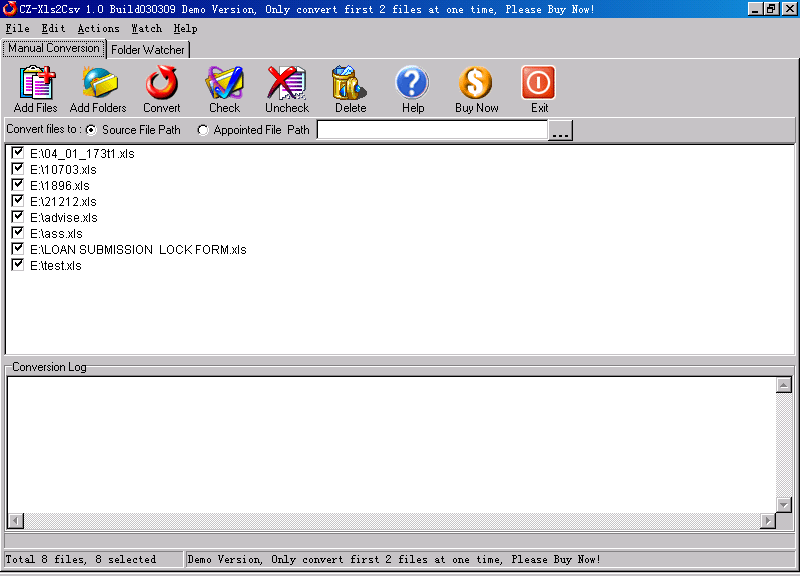
Please click "Manual Convert" tab sheet, you can simply press the "add files" button, then select the files to batch conversion list with ctrl or shift key, or click the "add folders" button to select the file folder. finally press the "convert" button, in a short time you will have finished conversion!
How does "Folder Watcher" work?
Please click "Folder Watcher" tab sheet, then click "Add Watch" button, and show a "Add Watch" dialog, and input "Source File Path", "destination File Path" and "File Filter", press "OK" button, you will add a file watch to folder watcher list. finally press "Start Watch" button, while the word documents are copied to the source path, then this folder watcher can automatically convert them into viewable html format of destination file path.
How to use command line run?
usage: cz-xls2csv <file path> </f:<destination file format code>> [/d:destination path] [/s] [/p:<open password>] [/e:<exclude words in file name or file path>] [/ef:<exclude file list file>]
| <file path> | the path and files want to be converted, for example, d:\*.xls; this parameter must exist. |
| </f:<destination file format code>> |
destination file format code, this parameter must exist.
|
| [/d:destination path] | the destination file path |
| [/s] | include the files in subfolders |
| [/p:<open password>] | open password for example:/p:123456, means you want convert excel files with open password 123456 |
| [/e:<exclude words in file name or file path>] | Exclude words in file name or file path, (use quotes when paths contain spaces) Hint: use ; as multi words's delmited char, for example this;test , supports wildcards (just * and ?), for example *_?_*.xlsx matchs test_2_sdsd.xlsx for example /e:"\inc\;test-;test*s", means you want to exclude file name or file path include \inc\ and test- and test*s |
| [/ef:<exclude file list file>] | Exclude file list, the list is saved in text file
for example /ef:"exclude.lst", means you want to exclude file, the exclude file list is saved in exclude.lst, an exclude file per line, exclude file name supports wildcards (just * and ?), for example *_?_*.xlsx matchs test_2_sdsd.xlsx exclude.lst example is below: |
example 1:
convert all excel xls files in disk d to csv files, the destination path is d:\destination
cz-xls2csv d:\*.xls /f:6 /d:d:\destination /s
example 2:
convert all excel xls files in d:\ dir to csv files
cz-xls2csv d:\*.xls /f:6
example 3:
convert "e:\program files\test.xls" with password 123456 to csv file.
cz-xls2csv "e:\program files\test.xls" /p:123456 /f:6
example 4:
convert all .xlsx files in "d:\destination path\test\" toText(Tab delimited) files, exclude result.xlsx, eom.xlsx and test3.xlsx
cz-xls2csv "d:\destination path\test\*.xlsx" /f:-4158 /s /e:result.xlsx;eom.xlsx;test3.xlsx
We are evaluating your product for our software product. We would like to distribute your product with our product if it fits to our requirement. We are interested knowing price structure for distribution license, where we can bundle your product with our product.
You can choose to pay for each copy, or pay for Developer License. After you order the developer license, there is not any limit for the developer license, you can bundle our product to your application, then redistribute your application to anyone, any times, and anytime.
You can order Developer License from http://www.convertzone.com/goto/order-cz-xls2csv-dev.php
How we can redistribute your product with our product? If it is possible, What file we need to insert in our setup?
You only just add cz-xls2csv.exe and czxls2csv.dat and register.dat to your setup, then ok.
I need to convert xls files containing Asian characters such as Japanese and Chinese. When I try this with CZ-xls2csv the non-western characters seem to be lost and replaced with question marks in the resulting csv file. Is there a way of specifying different character sets, such as UTF-8?
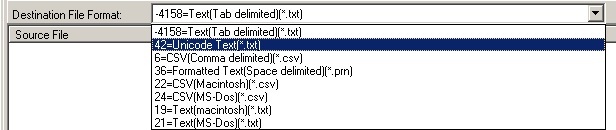
Please choose the destination file format to "unicode text" in cz-xls2csv gui, then you can convert then non-western characters ok.
Is there anyway of making the watch folder as a windows service? After the machine rebooted, so we missed a bunch of conversions because you needed to login to get the product running.
Yes, you can follow http://www.convertzone.com/scheduledtasks/ to run folder watcher at all times whether someone is logged in windows or not.
 Please click below button to buy CZ-Xls2Csv now, 100% Secure on-line