
| Products->CZ Word to Html : |
CZ Word to Html v5.0
|

 Word to Html trustdownload pick award Word to Html soft32download 5 star award Word to Html goldmedalsoft pick award Word to Html qweas 4 star award Word to Html dlmass 5 star award Word to Html topshareware 4 star award Word to Html geardownload pick award
About
CZ Word to Html can batch convert Word to html easily and quickly. It can watch source file folders and convert newly created or uploaded word to html files automatically. You can convert all documents (text, RTF, DOC and more) supported by Microsoft Office Word to html files once, saving you time!
| File Formats | note |
|
Word 2007 Document (*.docx) Macro-enabled Word 2007 Document (*.docm) Word 2007 Template (*.dotx) Macro-enabled Word 2007 Template (*.dotm) OpenDocument Text (*.odt) |
you need install ms word 2007 or above |
| Word 2003 XML Document (*.xml) | you need install ms word 2003 or above |
| Web Archive (*.mht; *.mhtml) | you need install ms word 2002 or above |
| Word Documents(*.doc)
Document Templates(*.dot) Web Pages(*.htm,*.html) Rich Text Format(*.rtf) Text File(*.txt) MS-DOS Text with Layout (*.asc) Text with Layout (*.ans) Word 2.x for Windows (*.doc) Word 4.0 for Macintosh (*.mcw) Word 5.0 for Macintosh (*.mcw) Word 5.1 for Macintosh (*.mcw) Word 6.0/95 (*.doc) Word 97-2002 & 6.0/95 - RTF (*.doc) Word for Windows 5.0 (*.doc) WordPerfect 5.0 (*.doc) WordPerfect 5.0 Secondary File (*.doc) WordPerfect 5.1 for DOS (*.doc) WordPerfect 5.1 or 5.2 Secondary File (*.doc) WordPerfect 5.x for Windows (*.doc) Works 2000 (*.wps) Works 4.0 for Windows (*.wps) Works 6.0 - 9.0 (*.wtf) Works 6.0 - 9.0 (*.wps) Works 7.0 (*.wtf) Ami Pro 3.0 (*.sam) |
you need install ms word 95 or above |
|
Lotus 1-2-3 (*.wk1;*.wk3;*.wk4) Excel Worksheet(*.xls,*.xlw) FoxPro / dBASE (*.dbf) Recover Text from Any File(*.*) |
you need install ms word 95 or above |
| Outlook Address Book(*.olk)
Personal Address Book (*.pab) Schedule+ Contacts (*.scd) |
you need install ms word 95, 97, 2000, 2002 or 2003
please note these formats do not be supported by ms word 2007 or above |
System Requirements
1. You will need a Pentium 150 PC or higher, 16MB RAM or more.
2. The operating system should be 32 bit or 64 bit Win95, Win98, Win2000, WinNT 4.0, WinME, WinXp, Win2003, Win Vista, Win 7, Win 8, Win 2008, Win 2012.
3.Of course, you must install Microsoft Word 95 or higher for windows.
What's New
08/19/2013 released CZ Word to Html V5.0 Build130819, changed the calling ms word way that can keep cz word to html more stable, and fixed the error that folder watcher won't work.
10/27/2011 released CZ Word to Html V4.0 Build111027, supports multiple languages GUI, now including English, German, simplified Chinese, and traditional Chinese.
03/14/2008 released CZ Word to Html V3.1 Build080314, can convert the word documents with open password to html files, and command line supports open password function, thanks for Martin Brindley's advice.
01/17/2004 released CZ Word to Html V3.1 build040117, added "Same Path as Source File Path" function in manual conversion, and modified GUI (thank you to Gran Jnsson of TEK-en for his advice).
02/25/2003 released: CZ Word to Html V3.0 Build030225 added folder watcher function that will watch source file paths and convert newly-uploaded files (Word .DOC, RTF, or text) to html automatically. While users upload word files to your website, this folder watcher can automatically convert word into html viewable format.
03/04/2002 released CZ Word to Html V2.0 Build020304 : added functionality that supports dragging files and folders from your desktop. Added ability to convert files to designated destination file path, added /d: parameter in command line
02/25/2002 released CZ Word to Html V2.0 Build020225 fixed command line /h option, fixed problem with popping up a screen when launching application via command line using /h parameter.
02/20/2002 released CZ Word to Html V2.0 Build011208, fixed error that did not correctly process relation path in command line.
11/24/2001 released CZ Word to Html V2.0: new GUI interface, added ability to convert files in subfolders.
09/08/2001 released CZ Word to Html V1.1:, added support for command line arguments.
04/03/2001 released CZ Word to Html V1.0. Added batch conversion of word to html files.
 |
 |
| Manual Convert | Folder Watcher |
Faq
How does "Manual Convert" work?
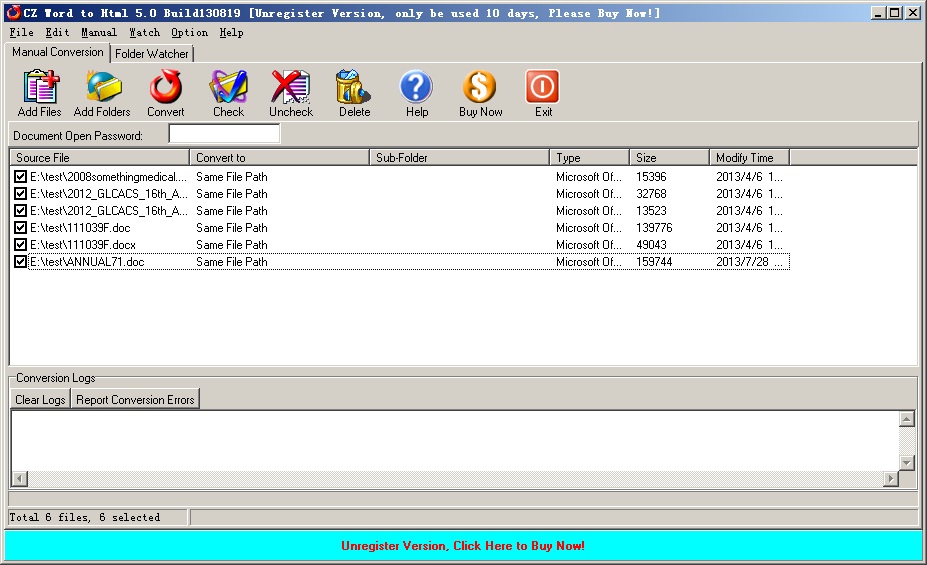
Click the "Manual Convert" tab. Then click "add files", then select the word files to batch-convert using the ctrl or shift key, or click "add folders" to select the file folder. Finally, press "convert" Your word to html conversion will finish very quickly.
How does "Folder Watcher" work?
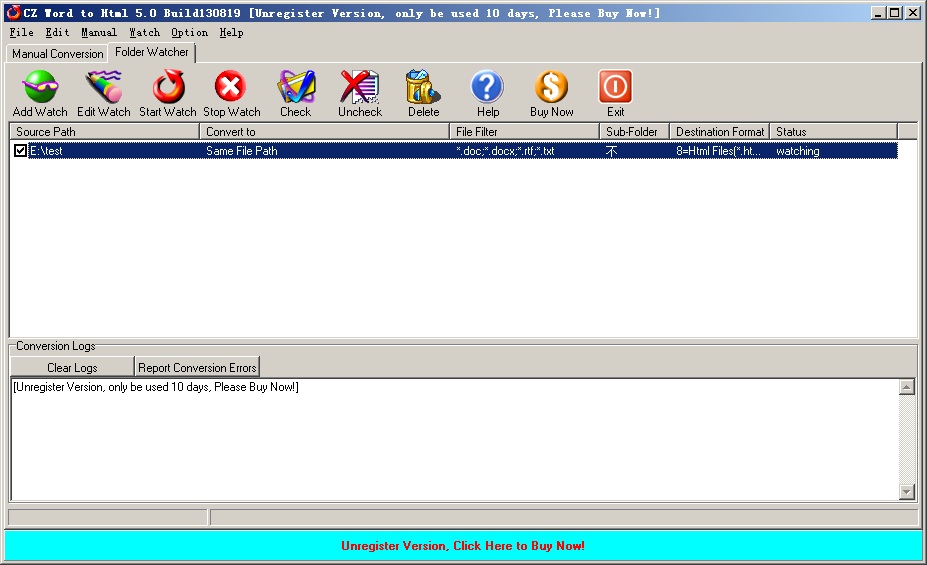
Click "Folder Watcher", then click "Add Watch" to reveal the "Add Watch" dialog. Enter "Source File Path", "Destination File Path" and "File Filter", press "OK", and you will add file watch to your list of folder that are watched. Finally click "Start Watch". While the Word files are copied or uploaded to the source path, The folder watcher can automatically convert word to html format at the destination file paths.
Why need to convert word to html files?
The Microsoft Word .Doc Document Format is the business world’s choice for digital documents. It’s easy to post Word .Doc files online for users to download. The Word .Doc document format is ideal for share because it is an popular office format. However, Word .Doc format has disadvantages too, for example, Word .Doc files are difficult to edit or publish or show on a website. That’s why we often need a way to convert Word to html files. CZ Word to Html helps you to convert Word to HTML files that retains the structure and formatting of the source.
How can I run the program from the command line?
usage: cz-doc2htm <file path> [/dfn:<destination file name>] [/d:<destination folder>] [/s] [/p:<open password>] [/e:<exclude words in file name or file path>] [/ef:<exclude file list file>
The command line will return 1 if the conversion has error, and the command line will return 0 if the conversion is successful.
Please notice: add quotes when argument contain spaces
| <file path> | the path and files want to be converted, this parameter must exist. for example, "d:\test path\*.doc" As shown in the example above, filenames that include spaces must be enclosed in quotes. |
| [/dfn:<destination file name>] |
the destination file name. for example /dfn:d:\test\dest.html, means converting to d:\test\dest.html file. |
| /d:<destination folder> | destination folder for example, /d:"d:\test path", means the conversion result will be saved to "d:\test path" folder As shown in the example above, filenames that include spaces must be enclosed in quotes. |
| /p:<open password> | open password for example:/p:123456, means you want convert word doc files with open password 123456 |
| [/e:<exclude words in file name or file path>] | Exclude words in file name or file path, (use quotes when paths contain spaces) Hint: use ; as multi words's delmited char, for example this;test supports wildcards (just * and ?), for example *_?_*.doc matchs test_2_sdsd.doc for example /e:"\inc\;test-;test*s", means you want to exclude file name or file path include \inc\ and test- and test*s |
| [/ef:<exclude file list file>] | Exclude file list, the list is saved in text file
for example /ef:"exclude.lst", means you want to exclude file, the exclude file list is saved in exclude.lst, an exclude file per line, exclude file name supports wildcards (just * and ?), for example *_?_*.doc matchs test_2_sdsd.doc exclude.lst example is below: |
| /s | include the files in subfolders |
Example 1:
convert all Ami Pro 3.0 .sam files in disk "d:\source path" to html files. The destination path is "d:\destination path"
cz-doc2htm "d:\source path\*.sam" /d:"d:\destination path" /s
Example 2:
convert all word .DOCX files in "d:\source path" to html files and with open password "abc123#"
cz-doc2htm "d:\source path\*.docx" /p:abc123#
example 3:
convert source1.doc file in "d:\source files" path to dest1.html file in "d:\dest files" path
cz-doc2htm"d:\source files\source1.doc" "/dfn:d:\dest files\dest1.html"
We are evaluating your software for use with our software. We would like to distribute your product with our product, if it fits our requirements. We are interested knowing your pricing structure for distribution license. How we can bundle your product with our product?
You can choose to pay for each copy, or you can buy a Developer License. There is no limit to the developer license. You can bundle our software with your application, then redistribute your application to anyone, any number of times, and anytime.
You can order word to html developer license from here
How we can redistribute your product with our product? If that is allowed, what files do we need to insert in our setup?
The only files you must add to your setup are cz-doc2htm.exe, CZDoc2Htm.dat and register.key.
Is there anyway of making the watch folder as a windows service? After the machine rebooted, so we missed a bunch of conversions because you needed to login to get the product running.
Yes, you can follow this article "How to run folder watcher at all times whether someone is logged in windows or not?" to run folder watcher at all times whether someone is logged in windows or not.
In MS Word I can do your such word to html conversion, why need your word to html?
Perhaps you have a lot of word documents, now office word format is so popular. One day you want to publish word to Internet, and you must convert word to html files formats. In MS WORD you can convert word to html files directly, but the result html files are not clean, and they have many unnecessary styles and extra mark-up code, and it is not easy to do batch word to html conversions in MS Word. So we developed this word to html, and it can batch convert Word to html, RTF to html, and text to html files quickly, and it produces a much cleaner html code than word normally produces. This word to html converter strips as many unnecessary styles and extra mark-up code as it can.
 Please click below button to buy CZ Word to Html now, 100% Secure on-line
 Download Free Trial (It will run only 10 days)